

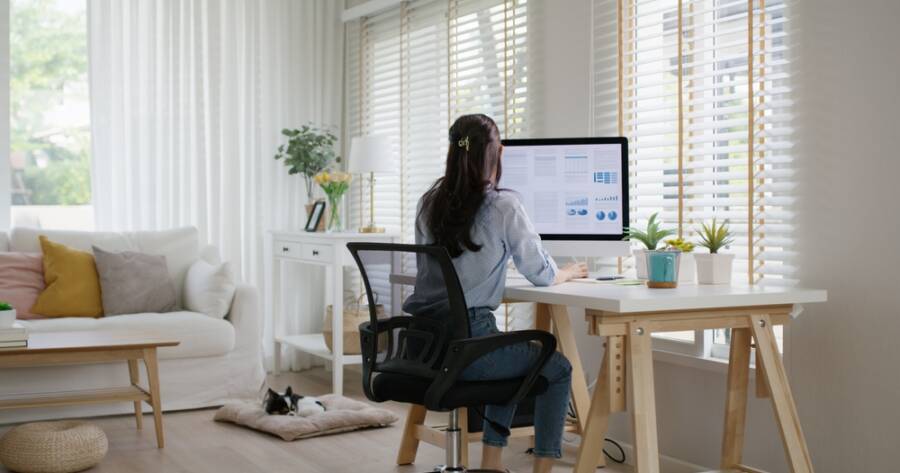
A functional home office does more than hold a laptop—it supports focus, comfort, and a workday that feels organized instead of chaotic. The right setup can make meetings smoother, reduce distractions, and protect posture and energy over long hours. Whether there’s an entire room available or only a corner of a bedroom, a few smart choices around layout, storage, lighting, and technology can turn almost any space into a workspace that feels purposeful and easy to maintain.
Choose the Best Location and Layout for Focus
Location is the foundation of a functional home office. A quiet room with a door offers privacy, but many homes require creative solutions such as a bedroom corner, a guest room setup, or a closet office. The goal is a space with minimal foot traffic and enough separation to support concentration.
Once the location is set, plan the layout around how work actually happens. Create zones: a primary workstation for daily tasks, a storage area for supplies, and a small spot for calls or quick thinking breaks if space allows. Keeping the desk oriented toward natural light can improve mood and reduce the cave-like feeling that often leads to distraction.
Invest in Ergonomic Furniture That Supports Your Body
Comfort drives productivity. A supportive chair with adjustable height, lumbar support, and armrests helps maintain posture and reduces fatigue. For long workdays, ergonomics matter more than aesthetics, since discomfort quickly turns into lost focus and slower output.
Desk choice should match the work style. A larger surface supports multiple monitors, paperwork, or creative projects, while compact desks work well for laptop-based tasks. Features like built-in drawers or cable management can reduce clutter instantly. If space is limited, wall-mounted fold-down desks or narrow consoles can provide a dedicated work surface without taking over the room.
Build Storage That Prevents Clutter Creep
A tidy workspace is easier to focus in, but it requires storage that matches daily habits. Use shelves, cabinets, or a small rolling cart to keep supplies nearby without overwhelming the desk. Vertical storage is especially helpful in small spaces because it preserves floor area and keeps essentials accessible.
Paper can become the fastest-growing category of clutter, so create a simple system: an inbox tray for incoming items, an action folder for time-sensitive tasks, and an archive box for documents worth keeping. Drawer organizers keep small supplies contained, while labeled bins prevent “miscellaneous” piles from spreading. When everything has a home, cleanup becomes quick and predictable.
Set Up Technology and Connectivity for Smooth Workdays
Reliable internet and consistent power access are non-negotiable for a home office. Position the workspace where Wi-Fi is strong, or use an ethernet connection if possible. A surge protector helps protect devices and keeps cords consolidated rather than scattered across outlets.
Cable management reduces visual clutter and prevents tangles. Cord clips, cable trays, and under-desk organizers keep wires tucked away. Consider practical upgrades such as a quality headset for calls, a webcam if video quality matters, and a second monitor for multitasking. Small tech improvements often deliver big efficiency gains, especially for remote workers managing meetings, documents, and communication tools throughout the day.
Create Lighting That Reduces Eye Strain
Lighting affects both comfort and performance. Natural light can boost energy and improve mood, so positioning the desk near a window is helpful when possible. To avoid glare, place the screen perpendicular to the window rather than directly in front of it or behind it.
Layer lighting to support different times of day. Task lighting, such as an adjustable desk lamp, reduces eye strain during focused work. Ambient lighting helps the room feel balanced and welcoming, especially on video calls. Choosing bulbs with a neutral-to-bright temperature can help maintain alertness, while softer lighting can support evenings when the workday extends later than planned.
Add Smart Boundaries and a Daily Reset Routine
A functional office depends on boundaries that separate work from home life. Even in shared spaces, a folding screen, rug, or dedicated shelf can create a visual “work zone” that supports focus. Keeping work supplies contained prevents the office from spilling into living areas and reduces the sense of always being on the clock.
A short end-of-day reset keeps the space usable without major cleanups. Spend five minutes filing papers, tossing trash, returning supplies to their homes, and wiping the desk surface. Writing down tomorrow’s top priorities can also reduce morning friction. Small daily habits protect the workspace from slow clutter buildup and help each workday start with a clean slate.
A Workspace That Works as Hard as You Do
A functional home office is built around comfort, clarity, and routines that reduce friction. The best setups prioritize focus through smart layout choices, ergonomic furniture, and storage that matches daily needs. With reliable tech, good lighting, and a space that stays tidy, work becomes easier to manage and less draining over time.
Even small upgrades can change how a workday feels. A better chair, improved lighting, or a simple paper system can reduce stress and boost productivity. When the workspace supports both performance and well-being, it becomes easier to stay consistent, protect work-life balance, and feel more in control of the day.